GSoC 2026 Submission Report
My GSoC 2026 final submission report for project: COSMIC Desktop Print Dialog. “A ship in harbor is safe, but that is not what ships are built for.” – Jhon A. Shedd Hello! This is my final report for my GSoC 2026 project: COSMIC Desktop Print Dialog. The goal of this project was to build a CPDB-based print dialog for the COSMIC Desktop Environment and integrate it with TLDR: My GSoC project focused on bringing native print dialog support to the COSMIC desktop environment through two interconnected efforts: modernizing the Rust CPDB client library and building a fully functional print portal for xdg-desktop-portal-cosmic. The CPDB library work is done and merged upstream into Here is a detailed overview of my GSoC project: To explain the goal I need to introduce three things that had to be glued together. COSMIC is System76’s new desktop environment, written in Rust on top of XDG Desktop Portals are the standard way for applications, especially sandboxed ones, to ask the desktop to do something on their behalf like opening a file, taking a screenshot, or like in our case printing a document. The application never gets direct access to your printers, It talks D-Bus to a portal, and the desktop’s portal implementation shows the UI and does the work. CPDB (Common Print Dialog Backends) is an OpenPrinting project that solves a long-standing duplication problem. Historically every toolkit (GTK, Qt, LibreOffice) implemented its own print dialog and its own CUPS integration. CPDB inverts that: print systems (like CUPS) each expose a backend process over D-Bus, and any dialog can be a frontend that discovers all the installed backends and talks to them through one common interface. Write your dialog once and it works with every print system that ships a CPDB backend. So the shape of the project was clear: make COSMIC a good CPDB frontend, and expose that frontend through the print portal. As per the proposal: After discussing this with Michael (@mmstick) he suggested to use zbus which solves all these problems and was already being used in COSMIC, and so I did. I wrote a completely new, pure-Rust, async CPDB client on top of Now anyone can use The API covers: This is the most interesting part. Every backend emits Keeping this shape allows us an easy integration with the GUI. On the COSMIC side, subscribing to the event stream looks something like this: A printer that comes online while the dialog is open appears in the list. One that goes offline grays out and, if it was selected, the dialog falls back gracefully. No polling, no main loop, no The work landed as PR #6 on With the library ready to be used, the second half of the summer went into The print portal has two methods, and the split between them is not obvious at first: There is a problem that I faced when mapping CPDB option values and XDG option values, the XDG print portal and CPDB do not agree on names. The portal speaks its own language and CPDB speaks IPP’s, some names are consistent but not all. One such example: Duplex is The solution I came up with is making the dialog’s own state the single source of truth, with two translation layers around it: Keeping these three functions separate, with the dialog state in the middle, means neither vocabulary leaks into the other, and adding a setting is a matter of touching one enum and three mapping arms. Everything is driven off the selected printer’s queried capabilities. To enable good user experience, A preset system was introduced in the design. I implemented it via Three presets are built in (Default, Color, and Black and White), and the user can save their own, edit them, and delete them. Every user visible string in the dialog goes through The COSMIC print dialog: feature-complete, in review. PR #331 implements the full It works end to end today. With CUPS and Or, just press Ctrl+P in a Flatpak application. It has been tested working with Evince and gedit. A sneak peek at what the dialog looks like currently: (check the PR comments for a video demo) Review feedback on PR #331. The review is active and I will be iterating on it. This is expected for a change of this size touching a shared component. Broader real-world printer testing. The dialog has been exercised against the printers and backends available to me. Printers vary in what options they expose and how, and more hardware coverage may surface edge cases in the capability-driven UI. The portal API itself. While building this, a set of limitations in the current XDG print portal API became clear, and they cap how good any implementation of this dialog can be: Thanks to Till Kamppeter at OpenPrinting, there is an active effort to discuss these limitations and design a better print API at the xdg-desktop-portal’s GitHub discussion. The COSMIC dialog deliberately targets the existing portal API for this cycle so it can ship and be useful now. When the improved API is ready, I will update the dialog to adopt it. The architecture, dialog state as the source of truth with mapping functions at the boundaries, was chosen partly so that this migration touches the edges rather than the core. Learning a desktop stack from the inside. Building a portal backend meant simultaneously understanding D-Bus service lifetimes, getting familiar with an unfamiliar GUI toolkit’s architecture, and a printing protocol. I did a lot of reading (some writing as well, I wrote a short blog on how iced works, you can read it at my blog or find the link at the bottom). What saved me was that The two-vocabulary problem. As described above, making sure the XDG portal and CPDB agree on the same option names was the fiddliest part of the project. Not intellectually hard, but full of small asymmetries where a value exists on one side but not the other. It also took me a while to accept that the right answer was three explicit mapping functions rather than one clever bidirectional abstraction. The design. A printing dialog is a GUI at the end of the day, it needs a user interface to allow users to interact with it and a good one at that. Now I am not desginer, and thankfully I didn’t need to be one, I got ample support from the cosmic team for the design part of this project. Two people made a real difference here. Michael from the COSMIC team was consistently available whenever I hit a technical wall in More than I expected going in: To Till Kamppeter and OpenPrinting for mentorship, for the CPDB project itself, and for taking the portal API limitations seriously enough to start a conversation about fixing them upstream. To Michael and Maria from the COSMIC team for technical and design support throughout. And to Google Summer of Code for making a summer of this kind of work possible. The COSMIC desktop will have a native print dialog, and Rust applications on Linux now have a clean, async, dependency-free way to talk to the printing stack. …
Project: COSMIC Desktop Print Dialog
Organization: The Linux Foundation
xdg-desktop-portal-cosmic (PreparePrint + Print) so desktop and sandboxed apps can print through a native COSMIC UX.OpenPrinting/cpdb-rs and published on crates.io as v0.1.1, and the print dialog is feature-complete and in review on pop-os/xdg-desktop-portal-cosmic#331. The project is complete according to the proposal, all that remains is feedback from the review cycle and the follow-up work that a newer portal API will unlock.Table of Content
cpdb-rsBackground: why this project exists
libcosmic, which itself builds on the iced GUI toolkit. It is a new DE, and until this project it had no print dialog of its own. If you press Ctrl+P in an application on COSMIC, you get whatever dialog the application’s own toolkit provides, usually the GTK one, which looks and behaves like a different desktop.xdg-desktop-portal-cosmic is COSMIC’s implementation, and it had backends for screenshots, screencasting, and file choosing, but the org.freedesktop.impl.portal.Print interface was missing entirely.
    graph TD
App["Application
(Flatpak / native)"]
Portal["xdg-desktop-portal"]
Cosmic["xdg-desktop-portal-cosmic
the dialog lives here"]
Backend["cpdb-backend-cups"]
CUPS["CUPS"]

    App -->|"D-Bus:
org.freedesktop.portal.Print"| Portal
    Portal --> Cosmic
    Cosmic -->|"cpdb-rs
D-Bus: org.openprinting.PrintBackend"| Backend
    Backend --> CUPS
Goals of the project
cpdb-rs so that Rust GUI applications, specifically async, event-driven ones like iced/libcosmic, can use CPDB comfortably without depending on GNOME LIB and GIO runtime. I planned to use zbus here.org.freedesktop.impl.portal.Print in xdg-desktop-portal-cosmic, covering both the PreparePrint and Print methods of the portal contract.Part one: updating
cpdb-rsThe problem with the old bindings
cpdb-rs already existed as a set of safe-ish Rust wrappers around cpdb-libs, the C frontend library. The approach would have worked, but it had some costs for a consumer like COSMIC:cpdb-libs uses GLib’s main loop for its D-Bus plumbing and its callbacks. An iced application already has its own event loop and its own async runtime. Running a GLib main loop next to it, just to get printer events, means we use an extra CPU thread and an extra dependency.iced Subscription means bouncing through channels and unsafe at every step.cpdb-libs development headers installed, with introduces another layer of friction in development, testing and distribution.What I built
zbus, with no C dependency at all. The crate now has two features:zbus-backend (default): the new native async client.ffi (optional): the original C bindings, moved into a separate workspace member, cpdb-sys, and preserved.cpdb-rs with just pure async rust, and with tokio as well:use cpdb_rs::CpdbClient;
let client = CpdbClient::new().await?;
let printers = client.get_all_printers().await?;
for p in &printers {
println!("{} [{}] - {}", p.name, p.id, p.make_model);
}
let (options, media) = client
.get_printer_details(&printer., &printer.)
.await?;CpdbClient::new() scans D-Bus for services matching the CPDB backend naming convention, connects to each, and holds a proxy per backend. A system may run more than one backend, so every method that identifies a printer takes both a printer ID and a backend name, because IDs are only unique within a backend.Capability Method Discover printers across all backends get_all_printers()Discover, minus remote/temporary printers get_filtered_printers()Live add/remove/state-change events discovery_stream()Options, media sizes and margins get_printer_details()Localised option and value names get_translations()The system default printer get_default_printer()Submit a job, receive a writable FD print_fd()Submit a job over a socket print_socket()Keep backends alive during a dialog session keep_alive_all()Toggle remote/temporary printer visibility show_remote_printers(), show_temporary_printers()The event stream
PrinterAdded, PrinterRemoved and PrinterStateChanged D-Bus signals whenever a new printer is added, goes offline, or is enabled/disabled to receive print jobs. The client subscribes to all of them across all backends, maps each signal into a typed enum, and merges them into a single stream with futures_util::stream::SelectAll:pub enum DiscoveryEvent {
PrinterAdded(PrinterSnapshot),
PrinterRemoved { id: String, backend: String },
PrinterStateChanged { id: String, backend: String, state: PrinterState },
}Subscription::run_with(PrinterDiscovery, |_| {
cosmic::iced::stream::channel(100, |mut output| async move {
let client = CpdbClient::new().await?;
let mut stream = client.discovery_stream().await?;
while let Some(event) = stream.next().await {
let _ = output.send(Msg::DiscoveryEvent(event)).await;
}
})
})unsafe.Other things that went into the crate
PrinterState enum with an is_ready() helper.PrinterConfig, for global and per-printer settings.discover_printers, filter_printers, get_translations, print_a_document).OpenPrinting/cpdb-rs and is published on crates.io as cpdb-rs 0.1.1 and cpdb-sys 0.1.1.Part two: the COSMIC print dialog and portal
xdg-desktop-portal-cosmic itself: roughly 4,200~ lines of code (at the time of writing this).The portal contract
PreparePrint: the application says requests to print a document and passes some preferred settings. The portal shows the dialog, the user picks a printer and settings, and the portal returns the chosen settings plus a token. No document is transferred in this step.Print: the application passes an FD holding the document. If it includes a token from a previous PreparePrint call, the portal must print without showing any UI, reusing the settings associated with the token (tokens are one time use). Without a token, the portal shows the dialog and then prints.Settings translation
"horizontal" to the portal and "two-sided-long-edge" to CPDB. Similarly, Color is use-color: "true" on one side and a color-mode option on the other. And There are many such cases.apply_xdg_hints(): takes the settings and page-setup vardicts the application sent and seeds the dialog’s state from them, so an app’s preferences are respected as the starting point.build_xdg_response(): converts dialog state back into the keys the portal specification expects, for the response.build_cpdb_settings(): converts the same dialog state into the option names the CPDB backends expect, for actual job submission.Submitting the job
print_fd() submits the job description to the backend and hands back a job ID and a writable file descriptor. The document then has to be streamed from the application’s FD into that one. A minor hiccup faced here: CPDB backends (CUPS in particular) populate internal lookup tables lazily, so a printer query must happen before submission or the job is rejected for an “unknown” printer that you just listed a second ago. The copy itself runs on tokio::task::spawn_blocking, because a large document should not stall the portal’s async executor:let (job_id, cpdb_writable_fd) =
client.print_fd(&printer_id, &backend, &settings_ref, &title).await?;
tokio::task::spawn_blocking(move || {
let mut reader = File::from(document_fd);
let mut writer = File::from(OwnedFd::from(cpdb_writable_fd));
std::io::copy(&mut reader, &mut writer)
}).awaitThe dialog itself
src/print_dialog.rs is largest single piece of the project. It follows the standard iced/libcosmic architecture and covers:Presets
cosmic-config in cosmic-portal-config:pub struct PrintPreset {
pub id: String,
pub name: String,
pub is_builtin: bool,
pub color_mode: String,
pub orientation: String,
pub duplex_index: Option<usize>,
pub copies: u32,
pub collate: bool,
pub pages_per_sheet_index: Option<usize>,
pub layout_direction: String,
pub margins: String,
pub scaling: String,
pub custom_scaling_input: u32,
pub page_selection: String,
pub custom_range_input: String,
}Localization
fl!, Fluent-based localization. CPDB provides translations for the printer options, the provided translations are utilized in the dialog, well known IPP values were given fluent macro support as well. I added around 110 new keys to the translation catalog. Once the PR is merged translations will be accepted as contributions via Weblate.Current state
cpdb-rs: complete and merged upstream. The zbus backend is merged upstream into OpenPrinting/cpdb-rs, is the crate’s default feature, and is published on crates.io at 0.1.1. The C bindings were preserved behind the ffi feature in cpdb-sys for anyone who needs them.org.freedesktop.impl.portal.Print interface. Every item on the PR’s TODO list is checked off: the token system, the Print execution path, Save as PDF, option presets, localization, and alignment with the design the COSMIC design team specified. It is currently in the review cycle with the COSMIC team and is not yet merged.cpdb-backend-cups installed, you can run the portal and either fire a request by hand:$ gdbus call --session --timeout 9999 \
--dest org.freedesktop.impl.portal.desktop.cosmic \
--object-path /org/freedesktop/portal/desktop \
--method org.freedesktop.impl.portal.Print.PreparePrint \
"/org/freedesktop/portal/desktop/request/1" \
"com.test.App" \
"" \
"Test Print Document" \
"{'gtk-print-backgrounds': <true>, 'gtk-print-header-footer': <false>}" \
"@a{sv} {}" \
"{'modal': <true>}"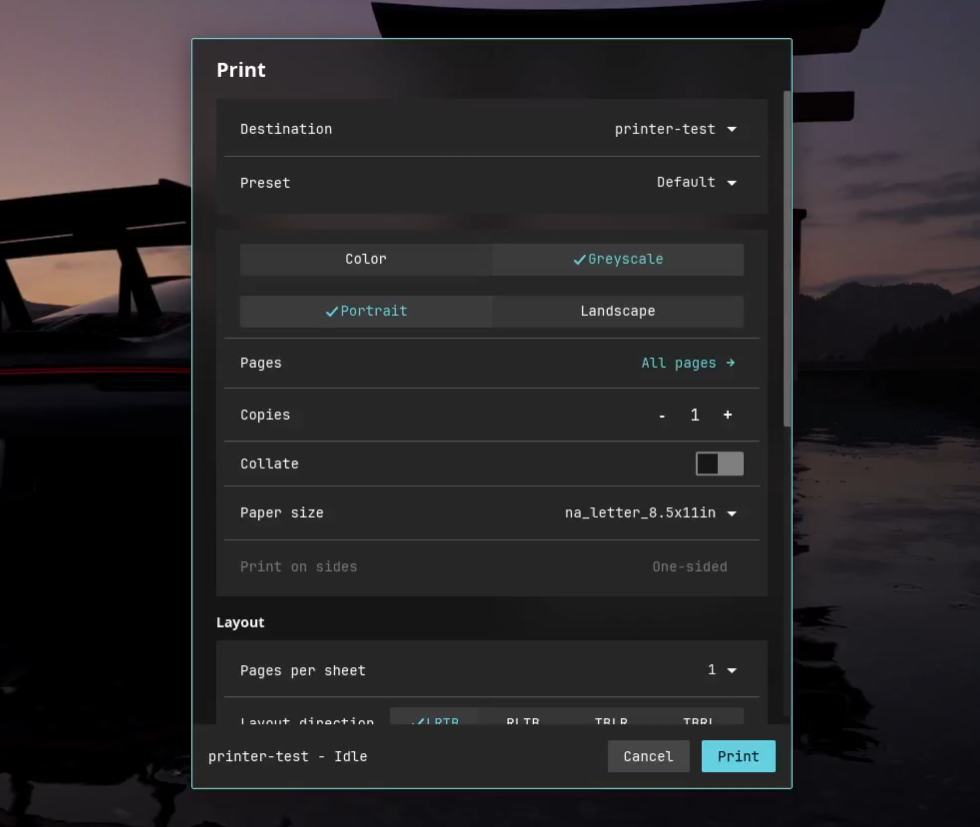
What’s left to do
Print step, after all settings are chosen. The dialog therefore cannot show you what the page will look like as you change margins, scaling or pages-per-sheet, a feature users reasonably expect from a print dialog today.Challenges faced during the program
xdg-desktop-portal-cosmic already had well-built implementations of the screenshot, screencast and file-chooser portals. Having working reference code for “what does a portal request look like in this codebase” turned a from-scratch design problem into a pattern-matching one, and it is a strong argument for the value of a codebase with more than one example of each thing.libcosmic or the portal internals. Maria from the COSMIC team gave full support on the design side. The dialog follows the COSMIC design, and any design question I had got answered.What I learned
cpdb-libs’ C API - bindgen, callback trampolines, ownership rules across the boundary. The most valuable thing that taught me was how to recognize when the FFI layer is not actually load-bearing. This was my first time working with FFI, especially the Rust and C boundary, but taking in account its practicality with the project I ended up using zbus and not this.cpdb-rs was probably the most fun thing I did this year.iced/libcosmic. Enough that I wrote up a separate blog on how iced works, building a small live CPU-usage system monitor as the worked example: Getting started with iced.cpdb-rs is the first crate I have had a major part in shipping to crates.io that will have real users.Thanks
Links